Show the time
your work saves.
A structured log for the workflow improvements you ship. Documented, quantified, and shared the same way every time.
 Executive export
 Share a link
 Start from an AI draft


Your improvements are invisible.
You improve workflows every week. You save your team hours. But when leadership asks what your team delivered this quarter, the evidence lives in scattered places nobody checks.
Posted 47 days ago · 3 reactions · no thread
Three steps. One standard format.
You describe what changed. Plano calculates the time saved and produces the outputs.
Map the change
~2 minWrite the before and after steps. Add a time estimate per step in minutes. Use the AI Draft Assistant for a structured starting point.
Set frequency and reach
~1 minEnter how often it runs and how many people it affects. Plano applies your working year assumptions automatically.
Share or export
~30 secShare a link for colleagues to review, or export a PDF for leadership and records. You control the link. Disable or regenerate at any time. Passcode protection is available on Pro.
Summaries built to stand alone.
Every improvement produces a shareable summary. Drop it into a deck, send a link, or attach it to a report. No spreadsheet required.
Drop it into a deck.
Full-resolution image of your improvement summary. Drag directly into PowerPoint, Keynote, or Google Slides.
Send a link you control.
Recipients see the full improvement summary, workflow comparison, metrics, and stated assumptions. No account needed. Disable or regenerate at any time.
Attach it to a report.
The Executive PDF is a one-page summary for leadership. The Detailed PDF is the full workflow comparison for the record. Every assumption is stated.
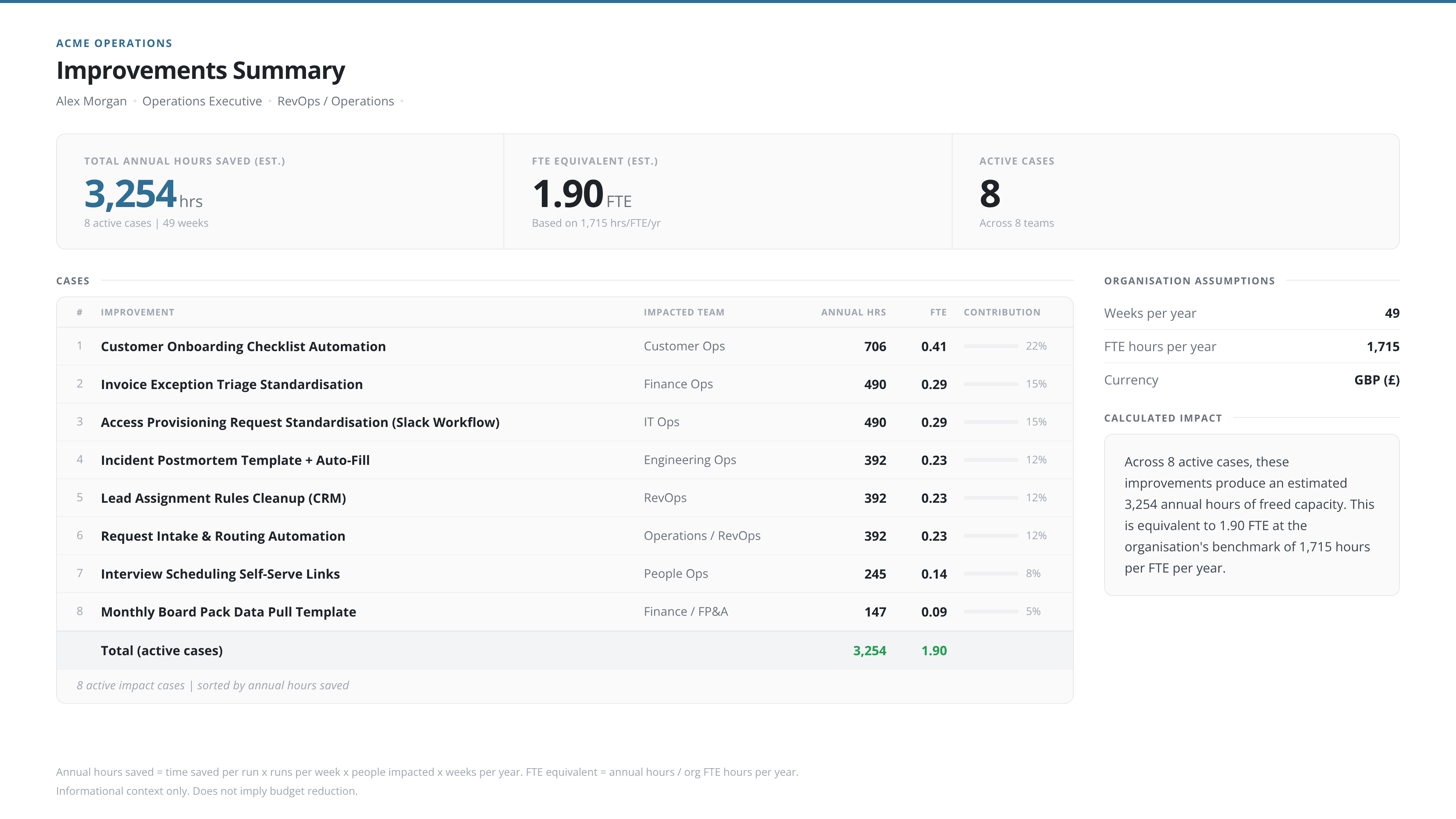
Pro also includes a portfolio summary across all your improvements, plus CSV export.
Built for teams that report upward.
If you improve workflows, build automations, or run process programmes and need structured evidence of what that delivered, Plano is for you.
AI and automation teams
You build automations and AI-assisted workflows that save hours across multiple teams. Plano documents what changed and calculates the time saved, so each improvement has a record that justifies the next one.
Operations and RevOps
You redesign workflows regularly and need a consistent format that shows what changed and how much time it saved. Plano gives you a structured improvement record without building a new spreadsheet every time.
Transformation, PMO, and Chiefs of Staff
You run improvement programmes across teams and report upward to leadership. Plano gives each initiative a structured record with consistent metrics, ready to share as a summary or roll up into a portfolio view.
Start free. Upgrade when you need Pro outputs.
Five improvements on Free. Enough to test the format with your team and stakeholders.
- Up to 5 improvements
- 3 AI draft builds per month
- ShareView link
- ShareView passcode protection
- Standard export
- Executive export (PDF + 4K PNG), 2 included
- Improvements Summary (PDF + 4K PNG), same 2-export quota
- CSV export
ShareView and Standard export include Plano branding.
Get started free- Unlimited improvements
- 150 AI draft builds per month
- ShareView link
- ShareView passcode protection
- Standard export
- Executive exports (PDF + 4K PNG), unlimited
- Improvements Summary (PDF + 4K PNG)
- CSV export
All outputs are unbranded.
- Custom FTE hours and working year
A few things people ask first.
Is Plano calculating financial savings?
No. Plano calculates hands-on time freed by a process improvement: time saved per run (est.), annual hours saved (est.), and FTE equivalent (est.). Any capacity value is labelled estimated, informational, and non-cash. It does not imply a cashable financial outcome or budget change.
What does "time saved per run" include?
Active, hands-on effort only, step by step. It excludes wait time, system processing, and elapsed calendar time. This conservative basis is visible in every output.
How is FTE equivalent (est.) calculated?
Annual hours saved (est.) divided by the productive hours assigned to one full-time role. The benchmark values are shown in Settings. On Pro, both values are adjustable in organisation settings.
Who can access a ShareView link?
Recipients can view a read-only summary via the link. No account required. You can disable or regenerate the link at any time. Pro adds optional passcode protection.
How does the AI draft assistant work?
The assistant turns a plain-English description of a process improvement into a structured before-and-after draft with suggested step times. You review, edit, and confirm before anything is saved. Free includes 3 builds per month. Pro includes 150.
What can I export on Free vs Pro?
Free includes ShareView, Standard export (both Plano-branded), and two executive exports. Pro removes all branding, adds passcode-protected ShareView, unlimited executive exports, Improvements Summary (PDF + 4K PNG), and CSV export.
Your improvements deserve a proper record.
Document your first improvement in minutes. Share a summary your stakeholders can read in thirty seconds.